No More Guessing: How Doggy Dose Keeps Your Whole Family in Sync
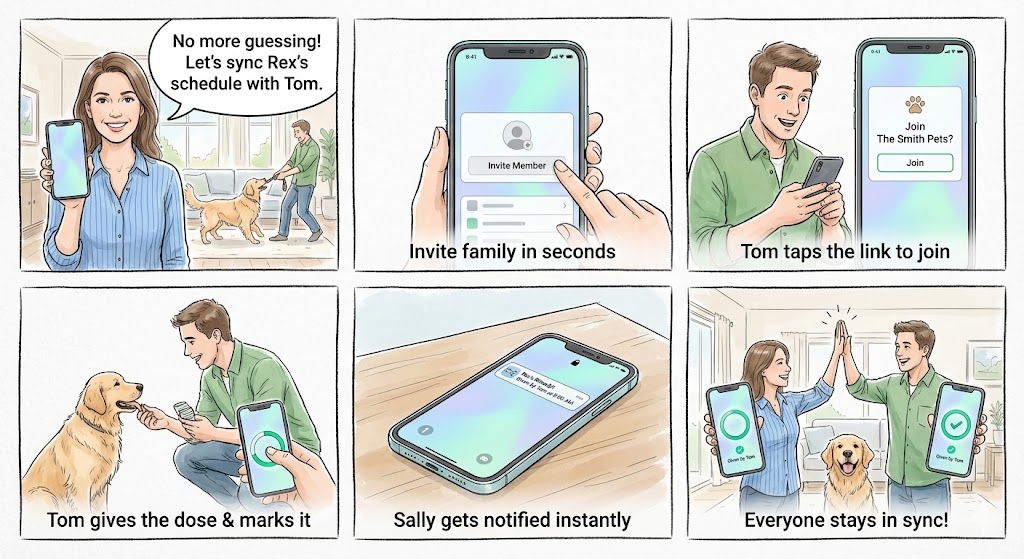
“Did you give Rex his pill this morning?”
“I thought you did.”
Sound familiar? When multiple family members care for a pet, medication coordination becomes a guessing game. Missed doses happen. Worse, double-doses happen. Doggy Dose was built specifically to solve this problem.
Here’s how family sync works.
The Problem We’re Solving
Pet medications—especially short-term prescriptions like antibiotics or post-surgery pain meds—require careful tracking. But life gets busy:
- Morning chaos — Everyone assumes someone else handled it
- Shift changes — You leave for work before your partner wakes up
- Extended family — Pet sitters, kids, or grandparents pitch in
The result? Uncertainty. And with medications, uncertainty is dangerous.
Step 1: Invite Family in Seconds
Open Settings, tap Invite Member, and share the link however you want—text message, AirDrop, email. That’s it.
No account creation. No passwords. No app-specific friend codes. Just a standard iOS share sheet with a link to your household.
Step 2: Tom Taps the Link to Join
When Tom receives the invite, he taps it. If he has Doggy Dose installed, it opens directly. If not, he’s taken to the App Store first.
Tom sees a simple welcome screen: “Join The Smith Pets?”
He enters his name, picks an avatar (photo or emoji), and taps Join. Done. No email verification, no password creation, no “accept terms and conditions” checkbox maze.
The entire process takes about 10 seconds.
Step 3: Tom Gives the Dose & Marks It
Now Tom sees the exact same dashboard Sally sees. Rex’s medications, schedules, and history—all synced in real-time through iCloud.
When Tom gives Rex his morning Rimadyl, he taps the dose card. The gray ring fills with green, and the card updates:
“Given by Tom at 8:02 AM”
This happens instantly on Tom’s phone. And on Sally’s phone. And on anyone else’s phone in the household.
Step 4: Sally Gets Notified Instantly
Sally’s phone buzzes. A push notification appears:
Rex’s Rimadyl Given by Tom at 8:02 AM
Sally doesn’t have to open the app, send a text, or wonder. She knows. The dose was given, Tom handled it, and she can get on with her day.
Step 5: Everyone Stays in Sync
Both phones show the same green checkmark. The same history. The same upcoming schedule.
If Sally marks the evening dose before Tom gets home, he’ll see it. If Tom ends the medication course early (vet’s orders), Sally’s app updates immediately. No one is ever working with stale information.
Why This Matters
Zero doubt — If the circle is green, the dose was given. You can see who did it and when.
Zero friction — Invite links work like sharing a photo. No accounts, no passwords, no setup wizards.
Zero data exposure — Everything syncs through your private iCloud. We never see your pet’s medication schedule, your family members, or any of your data.
Real-Time Sync, Powered by iCloud
Under the hood, Doggy Dose uses Apple’s CloudKit to sync data across your household. Changes propagate in seconds. The app works offline too—mark a dose while you’re in airplane mode, and it syncs the moment you’re back online.
This isn’t a server we run. It’s your iCloud account. Your data stays in your control.
Doggy Dose is now available as a public beta. Join the beta on TestFlight and never wonder “did you give it?” again.