Happy Vet, Healthy Pet: Export Medication History in Seconds
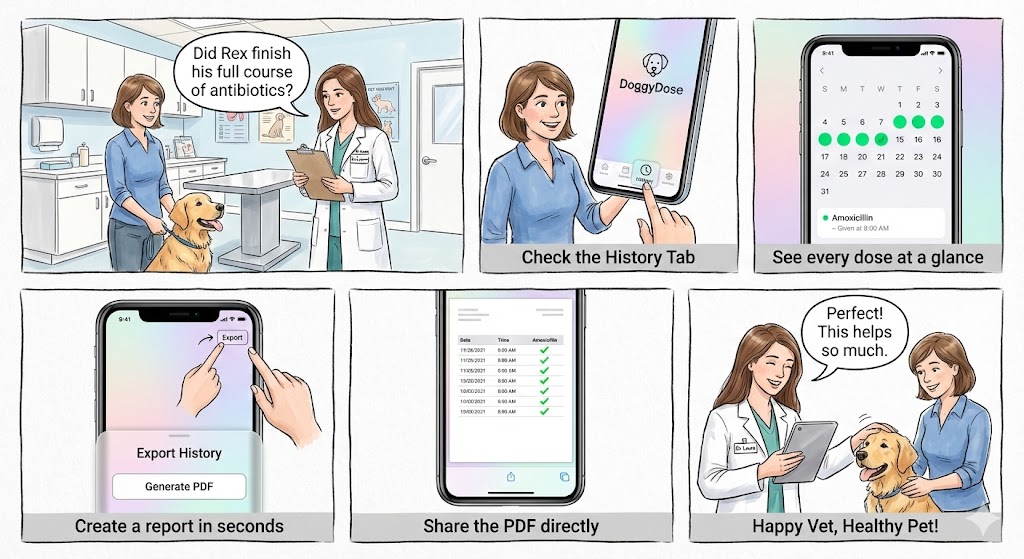
“Did Rex finish his full course of antibiotics?”
It’s a simple question, but trying to remember exactly which days you gave medication—and whether you missed any—can be stressful. Especially when you’re sitting in the exam room and the vet is waiting for an answer.
Doggy Dose keeps a complete record of every dose, so you never have to guess.
Why Medication History Matters
Veterinarians need accurate information to make treatment decisions:
- Antibiotic courses — Stopping early can lead to resistant bacteria
- Post-surgery pain meds — The vet needs to know if pain management was consistent
- Chronic medications — Patterns matter for adjusting dosages
- Follow-up visits — “How did the treatment go?” requires real data
Your memory isn’t reliable. A timestamped log is.
Step 1: Check the History Tab
Open Doggy Dose and tap the History tab. You’ll see a calendar view of the last 30 days with colored dots showing dose status at a glance:
- Green dot — All doses completed that day
- Yellow dot — Some doses given, some missed
- Red dot — All doses missed
- No dot — No doses scheduled
Tap any day to see the detailed log: which medication, what dosage, who gave it, and exactly when.
Step 2: See Every Dose at a Glance
The history list shows each dose with full context:
Amoxicillin 250mg Given by Sally at 8:02 AM ✓
Amoxicillin 250mg Given by Tom at 8:15 PM ✓
You can filter by pet (if you have multiple) or by specific medication. The calendar dots update to reflect your filters, making it easy to focus on exactly what the vet is asking about.
Step 3: Create a Report in Seconds
Tap the Export button in the top corner. A sheet slides up with simple options:
- Pet — Select which pet’s history to export
- Date range — Last 7 days, 14 days, 30 days, or custom
- Medication — All medications or a specific one
Tap Generate PDF and Doggy Dose creates a clean, professional report.
Step 4: Share the PDF Directly
The standard iOS share sheet appears with your PDF ready to go. You can:
- AirDrop it directly to the vet’s iPad
- Email it to the clinic
- Print it if they prefer paper
- Save it to Files for your records
The PDF includes everything the vet needs: pet name, date range, a table with every scheduled dose, timestamps, who administered each one, and completion status.
Step 5: Happy Vet, Healthy Pet
No more fumbling through memory. No more “I think we gave it every day.” Just hand over the report and let the data speak for itself.
Vets appreciate accurate records. It helps them make better decisions about your pet’s ongoing care. And it shows you’re a responsible pet parent who takes medication compliance seriously.
What the Export Looks Like
The PDF is designed to be clean and professional:
┌─────────────────────────────────────────────────┐
│  The Smith Pets                                 │
│  Rex (Golden Retriever)                         │
│  Medication History: Nov 15 - Nov 25, 2024      │
├─────────────────────────────────────────────────┤
│  Date       Time     Medication      Status     │
│  Nov 15     8:00 AM  Amoxicillin    ✓ Given    │
│  Nov 15     8:00 PM  Amoxicillin    ✓ Given    │
│  Nov 16     8:05 AM  Amoxicillin    ✓ Given    │
│  Nov 16     8:12 PM  Amoxicillin    ✓ Given    │
│  ...                                            │
├─────────────────────────────────────────────────┤
│  Generated by DoggyDose                         │
└─────────────────────────────────────────────────┘
Every dose. Every timestamp. Every detail the vet might need.
Your Records, Your Control
Like everything in Doggy Dose, your history stays in your private iCloud. We don’t have access to your pet’s medication records. When you export a PDF, it’s generated on your device and shared however you choose.
Doggy Dose is now available as a public beta. Join the beta on TestFlight and be ready for your next vet visit.